
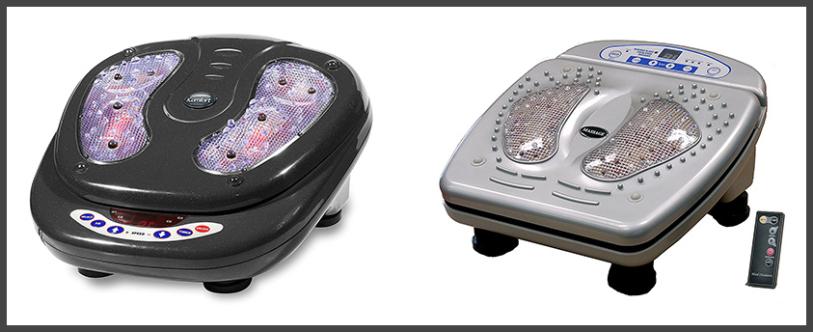
INFRARED FOOT MASSAGER
THE FOOT MASSAGE HAS BEEN USED DURING THOUSANDS OF YEARS ALL OVER THE WORLD.
It is almost a natural process after a long day of work to massage the feet and a natural way to relieve the pressure and pain of them.
The foot massage is a basic benefit that no person can question because, after this, you feel much better and is often the least worked and forgotten part of our body.
There is scientific evidence demonstrating the specific levels of benefits that are produced by massaging this area. The feet receive a greater circulation of blood, being the blood the life of each cell of our body, these they oxygenate and eliminate the accumulated toxins during the day.
A scientific study showed that there was a significant decrease in stress levels after a foot massage. Reducing stress levels can help the body in many ways, mentally and physically.
- 4 massage functions
- 15 levels of vibration intensity
- 8 levels of infrared intensity
- Includes calorie count consumed
- Timer for 10, 20 or 30-minute massages
- Includes remote control
- Voltage: 220-240 V.
- Frequency: 50 Hz.
- Power: 65 W.
- Usage: 30 min.
- Measures article: 38 x 38 x 21 cm.
- Box: 40 x 22 x 42 cm.
How To Choose A Monitor
Introduction
Since the dawn of the personal computer, the monitor has been the primary link between machine and user. Though the keyboard and mouse are the primary physical interface, the display most directly affects how easily you can accomplish your tasks whether it’s work or play.
The earliest screens used a cathode-ray tube to display an image. And up until the advent of graphical operating systems, that image was simple text. Thanks to the extended ASCII character set, basic pictures could be created on-screen but things like pixels and color depth were still far-off in the future.
The technology in use wasn’t much different than the televisions of the day. One to three electron guns would fire particles at a phosphor-coated surface on the inside of the large end of the tube. Those phosphors would glow forming an image made up of horizontal lines. The portion of each line that was illuminated could be as long or short as required. The earliest examples were monochrome, usually green. Later as hardware dropped in price, three guns, one for each primary color were employed creating the first full-color monitors.
By the end of their useful life, CRT monitors had reached vertical resolutions of over 1000 lines and could display full graphics. They were no longer limited to just text. But as the screen size increased, so did depth and weight. Despite efforts to manage the desktop footprint of these growing products, they eventually reached critical mass. Enter the liquid-crystal display (LCD).
By today’s standards, this old 4:3 15-inch screen doesn’t look any more modern than the CRT we showed you earlier. But it does have one important attribute, it’s a lot shallower than any tube-based monitor. The need to control desktop space and do more with less is one of the big reasons LCDs quickly evolved from executive toy to workaday tool. With that slim form factor came the possibility of larger screens. Thanks to graphical multi-tasking operating systems, one can never have enough virtual desktop real estate.
Today computer monitors mainly utilize the 16:9 aspect ratio with a few examples of the taller 16:10 still scattered about the marketplace. But the main thing that sets one model apart from another is resolution.
The image on an LCD panel is made up of millions of tiny dots. Each pixel consists of three sub-pixels, one for each primary color, red, green and blue. Obviously the more pixels you can pack into each square inch, the more realistic and smooth the image will be. But one must consider two factors which can render a high-pixel-density display less suitable for a particular system. The first is graphics card performance. Quite simply, the more pixels you have on the screen, the more processing power you need from your video card to move them around in a timely fashion. Ultra HD and 5K are capable of some stunning images but if your system isn’t up to the task of driving 14.7 million pixels, the overall user experience will suffer and that extra resolution will be a hindrance.
The second factor regards the font scaling capabilities of the operating system you plan to use. Improvements have been made but Windows is still best used at a pixel density of 90-100ppi. At higher values, objects and text become extremely small and potentially impossible to read. In our recent reviews of 27-inch 5K monitors, we were forced to use dpi-scaling if we wanted any hope of reading text in our applications. Scaling varies in quality and is not always a sure-fire fix when text becomes too tiny.
Before we delve into the individual considerations behind selecting a monitor, there’s one thing we can’t stress enough. Just like buying a home (location, location, location), a computer display should be considered by a similar mantra – application, application, application. Before you begin your research, it’s key to know what you plan on using the monitor for. There is no display that is best at all things. In the following pages we’ve broken it down into gaming, professional and general categories. These represent the three genres we cover most often in our product reviews. In each section we’ll cover what we think gamers, graphics pros and everyone else should consider before deciding on a shiny new screen for their systems. But before that, let’s take a quick look at the major panel technologies and how they affect image quality.
Panel Technologies And Manufacturers
There are three major technologies used in all LCD panels manufactured today, In-Plane Switching (IPS), Twisted Nematic (TN) and Vertical Alignment. Each has several variations associated with it that offer different advantages like better viewing angles, faster panel response, lower power consumption and the like. A quick Internet search will bring up dozens of articles on the intricacies of each technology so we won’t delve too deeply into the nuts and bolts here. What we’d rather do is talk about how each type affects image quality and what you can expect if you choose a particular one.M/p>
Twisted Nematic (TN)
The first LCD panels to appear on the desktop were of the TN variety. This is a panel in its simplest form. A layer of liquid crystals is sandwiched between two substrates. The crystals are twisted to either block or admit light. Each sub-pixel is controlled by a single transistor whose voltage determines the amount of light that gets through. All of this sounds great but what are the disadvantages?
The biggest problem with TN panels is their poor off-axis image quality. Because the light coming from any LCD is polarized, maximum brightness occurs only when it’s viewed on-center. That is the user is sitting with his eyes pointed straight at the center of the screen and that screen is perfectly perpendicular to the line of sight. Furthermore, the crystals are arrayed perpendicular to the substrates which increases the distance from the backlight to the front layer. This accentuates the viewing angle issue.
TN has one big advantage over other panel types however, it’s very fast. With only one transistor per sub-pixel and a six or eight-bit color depth, modern TN panels can have gray-to-gray response time as low as one millisecond when refresh.... For more details VISIT HERE
ABOUT US
Our only aim to providing you independent and unbiased product reviews that you can trust. If we wouldn’t happily use one of our trusted picks in our own home it does not make the list, no exceptions! Put us to the test now and read one of our product reviews.
Visit our main blog www.trustedpicks.comOUR GOOGLE+ PAGE
OUR FACEBOOK PROFILE
OUR TWITTER FEED
Tweets by TrustedPicksOUR OTHER SITES
- Google+ Profile
- Google+ Page
- YouTube
- WordPress
- Tumblr
- EverNote
- GetPocket
- OneNote
- Delicious
- Weebly
- Medium
- Facebook Page
- About Me
- Instapaper
- strikingly
- myfreesites.net
- sitey.me
- kiwibox.com
- zohosites.com
- Laptops Buying Guide
- FIRE BRIGADE GIVE KITCHEN SAFETY ADVICE TO CANTERBURY RESIDENTS
